.svg)
.svg)

How to Delete a Google Review: Tips and Best Practices for Dispensaries



How to Delete a Google Review
A single negative Google review can influence whether a potential customer walks into your dispensary or drives to a competitor. For cannabis businesses, where trust is already a barrier, review management is not optional, it is a critical part of your local SEO strategy.
When dealing with a negative review, before you start googling how to delete a Google Review, think about how you can handle it. Deletion shouldn't be your first thought. In some circumstances, responding to a negative review can be a more effective and lucrative option for businesses.
Google actively promotes businesses that are engaged and who respond to customer criticism. Plus, potential consumers are more likely to develop a positive impression of businesses that address critical reviews rather than just ignore them.
Can You Actually Delete a Google Review?
Short answer: You cannot directly delete someone else's Google review. Only the person who wrote it or Google itself can remove a review.
What you can do:
- Flag the review for removal if it violates Google's policies
- Respond professionally to show prospective customers how you handle feedback
- Request the reviewer update or remove their review after resolving the issue
- Report fake reviews to Google with evidence
When to Flag a Google Review for Removal
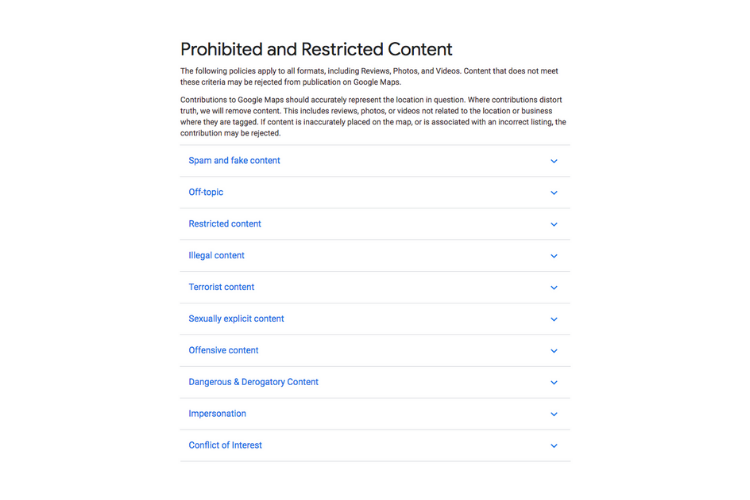
Google will remove reviews that violate their review policies:
- Fake or spam reviews — Posted by bots, competitors, or people who never visited your dispensary
- Off-topic reviews — Not about the actual customer experience at your business
- Restricted content — Reviews containing hate speech, threats, or explicit content
- Conflict of interest — Reviews posted by current or former employees
How to Flag a Review on Google Business Profile
- Log in to your Google Business Profile
- Navigate to Reviews
- Find the review you want to report
- Click the three-dot menu and select "Report review"
- Choose the reason for reporting
- Google will review within 5-14 days
For cannabis dispensaries: Reviews that make false claims about product quality or legality may also qualify for removal if they contain verifiably false statements.
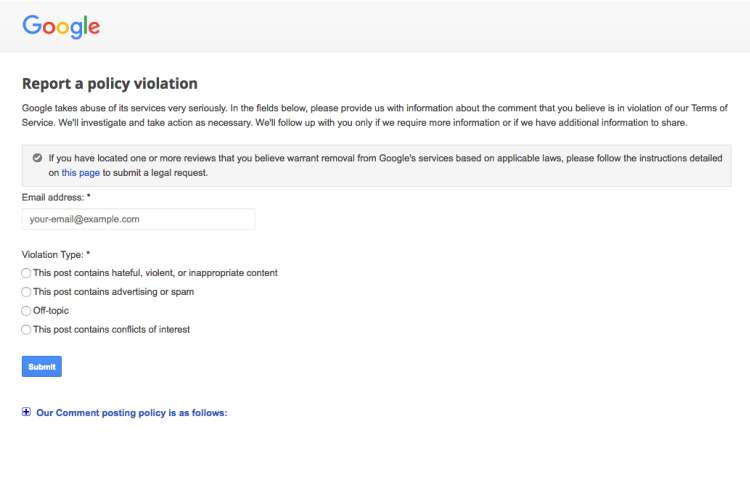
Each review contains three dots in the upper right-hand corner, which can be clicked to reveal a menu with a variety of different options. One of the review options displayed is “Flag as inappropriate.” Clicking this will take you to a policy violation form, where you can describe the issue with the review and submit it for a moderator to process.
Criteria for Removing Google Reviews
Unfortunately, you can't just flag every review you don't like. Google has specific criteria that must be met before a review is deleted. The most common type of deleted review is spam or advertising from bots attempting to take advantage of the public platform a review section provides.
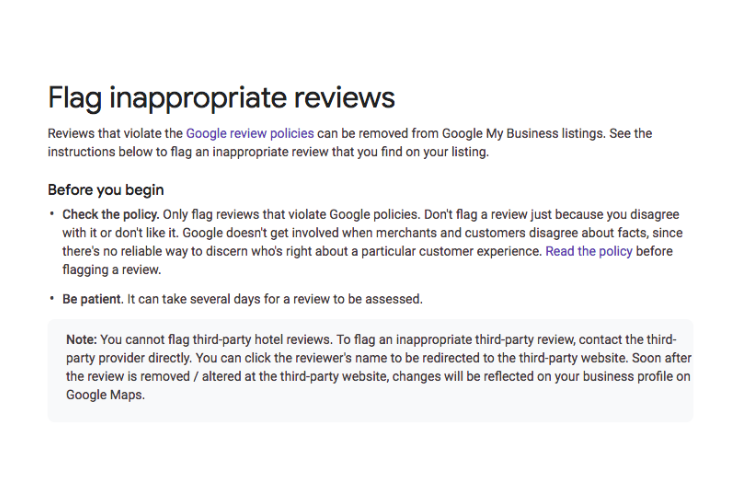
Ok, you've flagged a review. Now what?
Well, unfortunately, Google does not answer every request for review deletion. Reviews will usually be deleted if they contain profanity or inappropriate language.
In a similar vein, if one person has made multiple negative reviews, this is considered spam and Google will take action. Reviews posted by competing businesses, fake or irrelevant reviews, or reviews by disgruntled former employees are all considered in violation of Google’s terms of service and can be subject to deletion.
How to Respond to Negative Reviews (The Better Strategy)
Responding to negative reviews publicly demonstrates professionalism and care. Studies show that businesses that respond to reviews earn more trust from prospective customers than businesses with only positive reviews.
Response Template for Dispensaries
"Thank you for sharing your feedback, [Name]. We take every customer experience seriously. We would like to learn more about what happened and make it right. Please reach out to us at [email/phone] so we can address your concerns directly."
Best Practices for Review Responses
- Respond within 24-48 hours
- Acknowledge the concern without getting defensive
- Take the conversation offline for resolution
- Never disclose customer purchase information (compliance risk for cannabis businesses)
- Follow up after resolution and politely ask if they would consider updating their review
How to Get More Positive Reviews
The best defense against negative reviews is a steady stream of positive ones:
- Ask satisfied customers to leave a review at checkout
- Include a review link in post-purchase emails
- Train budtenders to mention reviews during positive interactions
- Use QR codes in-store that link directly to your Google review page
- Never offer incentives for reviews (violates Google and FTC policies)
How Reviews Impact Dispensary SEO
Google reviews directly influence your cannabis local SEO performance:
- Review quantity and quality are ranking factors for the local 3-pack
- Review recency matters — a steady flow of recent reviews signals an active business
- Review responses show Google (and customers) that you are engaged
- Keywords in reviews can help you rank for terms customers mention naturally
For more on managing your dispensary's digital reputation, explore why online reviews matter for cannabis businesses.
Need help with dispensary reputation management and local SEO? Talk to our team.